クイックスタート
ラベル付きの核は、文字列リストのプロファイルと配列です。profile は数値の
形状、labels は文字列を返します。ラベルの検索に使う軸番号は NumPy の軸で、
domain の軸が先、そのあとが codomain です。
import numpy as np
from fxtensor_salmon import FXTensor

profile = [[["a", "b"]], [["x", "y", "z"]]]
data = np.array(
    [
        [0.1, 0.2, 0.7],
        [0.3, 0.3, 0.4],
    ]
)
tensor = FXTensor(profile, data=data)
assert tensor.profile == [[2], [3]]
assert tensor.labels == ([["a", "b"]], [["x", "y", "z"]])
assert tensor.get_label_index(0, "a") == 0
assert tensor.get_index_label(1, 2) == "z"
同じ配列をラベルなしでも持てます。タプル (domain, codomain) も受け取れ、
その場合は常にラベルなしです。
import numpy as np
from fxtensor_salmon import FXTensor

profile = [[2], [3]]
data = np.array(
    [
        [0.1, 0.2, 0.7],
        [0.3, 0.3, 0.4],
    ]
)
tensor = FXTensor(profile, data=data)
assert tensor.profile == [[2], [3]]
assert tensor.labels == (None, None)
from_strands は辞書から成分を埋めます。ラベル付きプロファイルでは、キーは
そのラベルの入れ子リストです。無いキーは 0 のままです。
import numpy as np
from fxtensor_salmon import FXTensor

profile = [[["a", "b"]], [["x", "y", "z"]]]
strands = {
    "[[['a']], [['x']]]": 0.1,
    "[[['a']], [['y']]]": 0.2,
    "[[['a']], [['z']]]": 0.7,
    "[[['b']], [['x']]]": 0.3,
    "[[['b']], [['y']]]": 0.3,
    "[[['b']], [['z']]]": 0.4,
}
tensor = FXTensor.from_strands(profile, strands)
assert tensor.labels == ([["a", "b"]], [["x", "y", "z"]])
assert np.allclose(
    tensor.data,
    [
        [0.1, 0.2, 0.7],
        [0.3, 0.3, 0.4],
    ],
)
合成
composition は直列の接続です。受け手の codomain と引数の domain は一致して
いる必要があります。結果のラベルは、受け手の domain ラベルと引数の codomain
ラベルです。両方がラベル付きのときだけ残ります。
import numpy as np
from fxtensor_salmon import FXTensor

tensor1 = FXTensor(
    [[["a", "b"]], [["x", "y"]]],
    data=np.array(
        [
            [0.2, 0.8],
            [0.6, 0.4],
        ]
    ),
)
tensor2 = FXTensor(
    [[["x", "y"]], [["p", "q"]]],
    data=np.array(
        [
            [0.3, 0.7],
            [0.9, 0.1],
        ]
    ),
)
result = tensor1.composition(tensor2)
assert result.labels == ([["a", "b"]], [["p", "q"]])
assert np.allclose(
    result.data,
    [
        [0.2 * 0.3 + 0.8 * 0.9, 0.2 * 0.7 + 0.8 * 0.1],
        [0.6 * 0.3 + 0.4 * 0.9, 0.6 * 0.7 + 0.4 * 0.1],
    ],
)
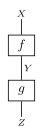
逐次合成 f ; g。
テンソル積
tensor_product は2つの射を並べます。状態では domain が空のままなので、
そのラベル群は None です。
import numpy as np
from fxtensor_salmon import FXTensor

tensor1 = FXTensor([[], [["a", "b"]]], data=np.array([0.3, 0.7]))
tensor2 = FXTensor([[], [["x", "y", "z"]]], data=np.array([0.2, 0.3, 0.5]))
result = tensor1.tensor_product(tensor2)
assert result.profile == [[], [2, 3]]
assert result.labels == (None, [["a", "b"], ["x", "y", "z"]])
assert np.allclose(result.data, np.outer(np.array([0.3, 0.7]), np.array([0.2, 0.3, 0.5])))

テンソル積 f ⊗ g。
天気
ラベルは任意の文字列です。同じ予報を英語でも日本語でも名付けられます。変わるのは プロファイルに保存する文字列だけです。
import numpy as np
from fxtensor_salmon import FXTensor

weather_states = ["Sunny", "Rainy"]
sunny_today = FXTensor([[], [weather_states]], data=np.array([1.0, 0.0]))
forecast_matrix = np.array(
    [
        [0.8, 0.2],
        [0.4, 0.6],
    ]
)
forecast_tensor = FXTensor([[weather_states], [weather_states]], data=forecast_matrix)
sunny_tomorrow = sunny_today.composition(forecast_tensor)
sunny_idx = sunny_tomorrow.get_label_index(0, "Sunny")
assert np.isclose(sunny_tomorrow.data[sunny_idx], 0.8)
assert sunny_tomorrow.labels == (None, [["Sunny", "Rainy"]])
import numpy as np
from fxtensor_salmon import FXTensor

weather_states = ["晴れ", "雨"]
sunny_today = FXTensor([[], [weather_states]], data=np.array([1.0, 0.0]))
forecast_matrix = np.array(
    [
        [0.8, 0.2],
        [0.4, 0.6],
    ]
)
forecast_tensor = FXTensor([[weather_states], [weather_states]], data=forecast_matrix)
sunny_tomorrow = sunny_today.composition(forecast_tensor)
sunny_idx = sunny_tomorrow.get_label_index(0, "晴れ")
assert np.isclose(sunny_tomorrow.data[sunny_idx], 0.8)
assert sunny_tomorrow.labels == (None, [["晴れ", "雨"]])
ユーザーガイド では、条件付け、ベイズ反転、複製と破棄、 DisCoPy 連携を扱います。